
Practical guides
Missing survey credit: a step-by-step troubleshooting guide
A survey completion screen and a confirmed account credit are different records. If the expected reward has not appeared, first check the activity’s stated confirmation process and preserve the completion reference.
Free to join · Adults 18+ · Availability and qualification vary

A little clarity goes a long way
Check the original terms and transaction history, then send one support request with the session reference and redacted evidence.
Which record is missing?
| Situation | Check | Action |
|---|---|---|
| Survey ended before acceptance | Exit message and screen-out terms | Use the screen-out guide first. |
| Accepted completion within review period | Original confirmation instructions | Keep evidence and follow the stated period. |
| Accepted completion after review period | Account activity and provider reference | Send one complete credit investigation request. |
| Credit is visible, reward not delivered | Your submitted redemption request | Use the reward-redemption guide instead. |
Find it in CinchBucks
These links open the relevant product areas. Member pages may ask you to sign in before displaying your own records.
- Review earnings
Check the overview, then compare the relevant account activity record.
- Check recent activity
Profile Settings includes recent credits and redemption-related records.
- Prepare a ticket
Use your saved reference, exact outcome and permitted redacted evidence.
Confirm what the activity promised
Look for the survey reference, displayed reward and any delayed-credit instructions you saved before starting. A screen-out, a recruitment questionnaire or the first part of a multi-part study may have different credit rules from a completed main survey.
Check account history before repeating anything
Open your CinchBucks transaction history and compare the date, provider and amount. A credit may use the provider’s name instead of the survey title. Check any pending status or account message.
Allow the review period specified by the activity. There is no single waiting period that applies to every survey provider. Do not repeat the same study to try to force a credit.
Build a ticket that can be investigated
Use the Help Center for the account you used to start the activity. If the provider supplied its own support route, follow that activity’s instructions and keep the reference.
- Subject: survey completion not credited — [provider / survey reference].
- Include the date, approximate completion time and time zone.
- State the expected credit and the status currently visible.
- Attach permitted completion evidence with private details hidden.
- Keep the ticket ID and add follow-up information in that conversation.
Understand the investigation limit
A screenshot helps describe an outcome, but it does not replace partner validation. Support may need a provider’s confirmation and cannot promise that every disputed session will be credited.
Do not include passwords, full payment details, identity documents or survey responses in an ordinary support ticket. Use only an official secure flow if verification is requested.
Where to look inside CinchBucks
The Earnings overview is a useful starting point for your account summary. Profile Settings also includes Recent account activity, where transaction records can help you identify a confirmed credit. Compare the source, date and reference when one is available, not just a total balance.
A balance can change because of another activity or a reward request. If you completed several tasks, do not assume that the most recent balance movement belongs to this survey. Record the individual entry you found, or explain that no matching entry is visible.
A worked example: completion yesterday, no matching entry today
Imagine the survey terms specify a review period and your account shows no matching credit the following morning. Preserve the completion reference and wait for the stated period. If the terms do not specify one, explain the uncertainty to Support rather than substituting a waiting time from another provider.
If the period has passed, send the reference, expected credit and current status in one ticket. If a credit later arrives, update the same ticket so Support knows which discrepancy remains. These are illustrative steps, not a promise of a particular investigation result.
Use the form fields to keep the request clear
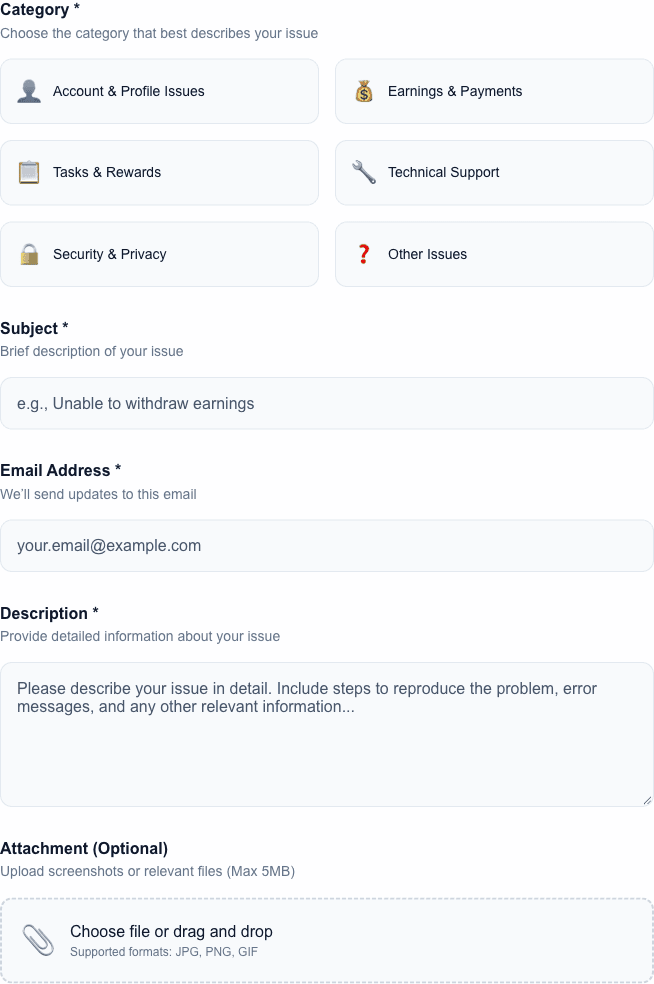
The support form has Category, Subject and Description fields, an account email field and an optional image attachment. “Earnings & Payments” is a useful starting category for a missing survey credit; describe a browser error clearly if the problem is technical instead.
The current attachment form accepts JPEG, PNG and GIF images up to 5 MB. Redact account identifiers unrelated to the case, private answers and reward codes before attaching evidence. Keep your own original privately in case Support asks for clarification.
Missing-credit ticket template
Replace the bracketed prompts with your own activity details inside the official support form. This example does not submit a ticket or send information.
Subject: Completed survey credit missing — [provider / reference]

Provider and survey reference: [details]
Started / completed: [date, time and time zone]
Expected credit shown before starting: [amount]
Final message: [exact wording]
Current account activity status: [what you see]
Review period stated in the activity: [period, or not specified]
Evidence: [permitted, redacted completion image]

Please check whether this session was confirmed and whether a matching credit exists.
Open the support form
Common questions
How long should I wait?
Use the review period in the activity’s terms or status message. If no period is given and the outcome is unclear, ask Support with the session details.
Should I submit another ticket?
Keep related evidence in the original ticket so the investigation has one complete history.
Should I attach a bank statement for missing survey credit?
A survey reference and permitted completion evidence are more relevant. Do not attach unrelated financial documents or sensitive account information.
What if I never saved the reference?
Provide the provider, approximate time, time zone and visible outcome. Say that the reference is unavailable. Do not invent one or replay the study to try to obtain another.
Sources & scope
Based on CinchBucks product flows and support guidance. Check the original activity terms and your live account for current eligibility, rewards and processing instructions.
Found an unclear detail? Contact CinchBucks.